The OutSized rich text editor is used for stories, interactive chapters, blog posts, forum threads, and other formatted text. Its document mode supports both everyday formatting and longer structured work.
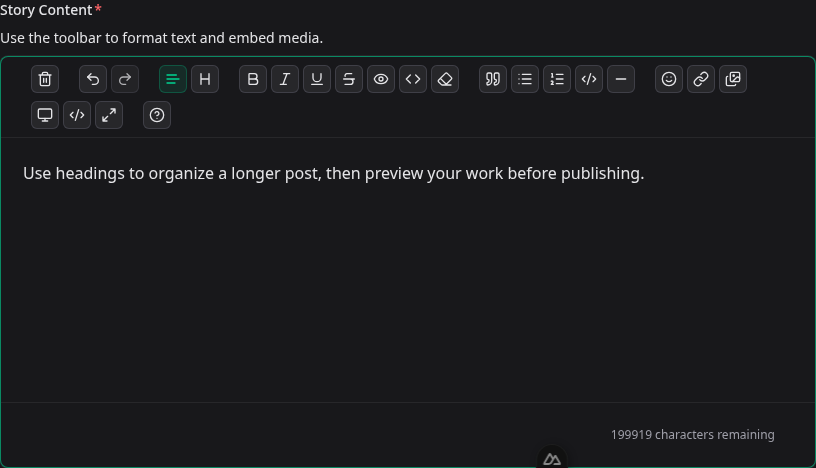
Start writing
Select the writing area and type normally. Select existing text before applying inline formatting such as bold, italic, underline, strike, spoiler text, or inline code. Headings and lists apply to the current paragraph or selected blocks.
Toolbar guide
- Clear, undo, and redo: reset the document or move through recent edits.
- Paragraph and headings: choose normal text or one of six heading levels.
- Inline formatting: bold, italic, underline, strike, spoiler text, inline code, and clear formatting.
- Blocks: quotes, bullet lists, numbered lists, code blocks, and dividers.
- Insert: emoji, links, and media. Available media tools depend on the composer you are using.
- View tools: preview the rendered result, inspect the HTML source, or enter fullscreen mode.
Links and media
Select text and choose the link button to add a destination and optional title. If you enter a domain without a protocol, the editor adds https://. Links open in a new tab when the finished post is viewed.
In document composers, Insert media opens the composer's media workflow. Uploaded attachments can also be inserted into the body where that post type supports it.
Preview, source, and fullscreen
- Preview shows how the formatted content will render to readers.
- View source exposes formatted HTML for advanced corrections. Return to the editor to continue visual editing.
- Fullscreen gives longer work more room. Press Escape or use the fullscreen button again to exit.
Writing and publishing tips
- Use headings in order so longer posts are easy to scan.
- Use spoiler formatting for a short reveal, not for entire sections of a document.
- Keep paragraphs focused and preview at least once before submitting.
- Save a draft from the composer while working. Publishing controls belong to the composer, not the editor toolbar.
- If the character counter reaches zero, shorten the document before saving or submitting.